
CIS deduction statement template: what goes in every box
The reference at the top is yours. The UTR is theirs. The statement needs to show what you paid and withheld, with the optional boxes kept separate from the required details.

Your payment and deduction statement is the written record you give your subcontractor of what you paid and withheld under the Construction Industry Scheme (CIS).
Without it, they can finish the tax year with deductions to claim and nothing to support them. HMRC’s manual CISR74030 allows alternative evidence where deductions cannot be confirmed, and claims may be restricted to the amount that evidence supports. Missing paperwork puts the work of proving the deduction on the person you paid.
If you need to revisit the deduction calculation before filling in the statement, the rules are in CIS explained for UK trades.
Your CIS deduction statement template, ready to copy
HMRC’s CIS340 guide for contractors and subcontractors lets you choose the layout. The template below follows the required information in CIS340 section 3.15, checked on 21 September 2026. It is an editorial layout, not an official HMRC form.
The standard deduction rate is 20%; the higher rate is 30%. Only higher-rate deductions need the verification number.
Construction Industry Scheme
Payment and deduction statement

Contractor's name:
Contractor's address (optional):
Employer's tax reference:
Tax month ending / single payment date:

Subcontractor's full name:
Subcontractor's Unique Taxpayer Reference (UTR, their tax reference):
Verification number (higher-rate deductions only):

Gross amount paid excluding VAT (A):
Less cost of materials:
Amount liable to deduction (optional):
Deduction rate applied (optional):
Amount deducted (B):
Amount payable excluding VAT (A minus B, optional):
VAT charged (optional):
You choose the style, including a spreadsheet or word processor layout. HMRC publishes a blank PDF titled Payment and deduction statement, and its manual CISR96020 lists that PDF as an example, so neither design is compulsory. Optional entries and the higher-rate condition are marked above.
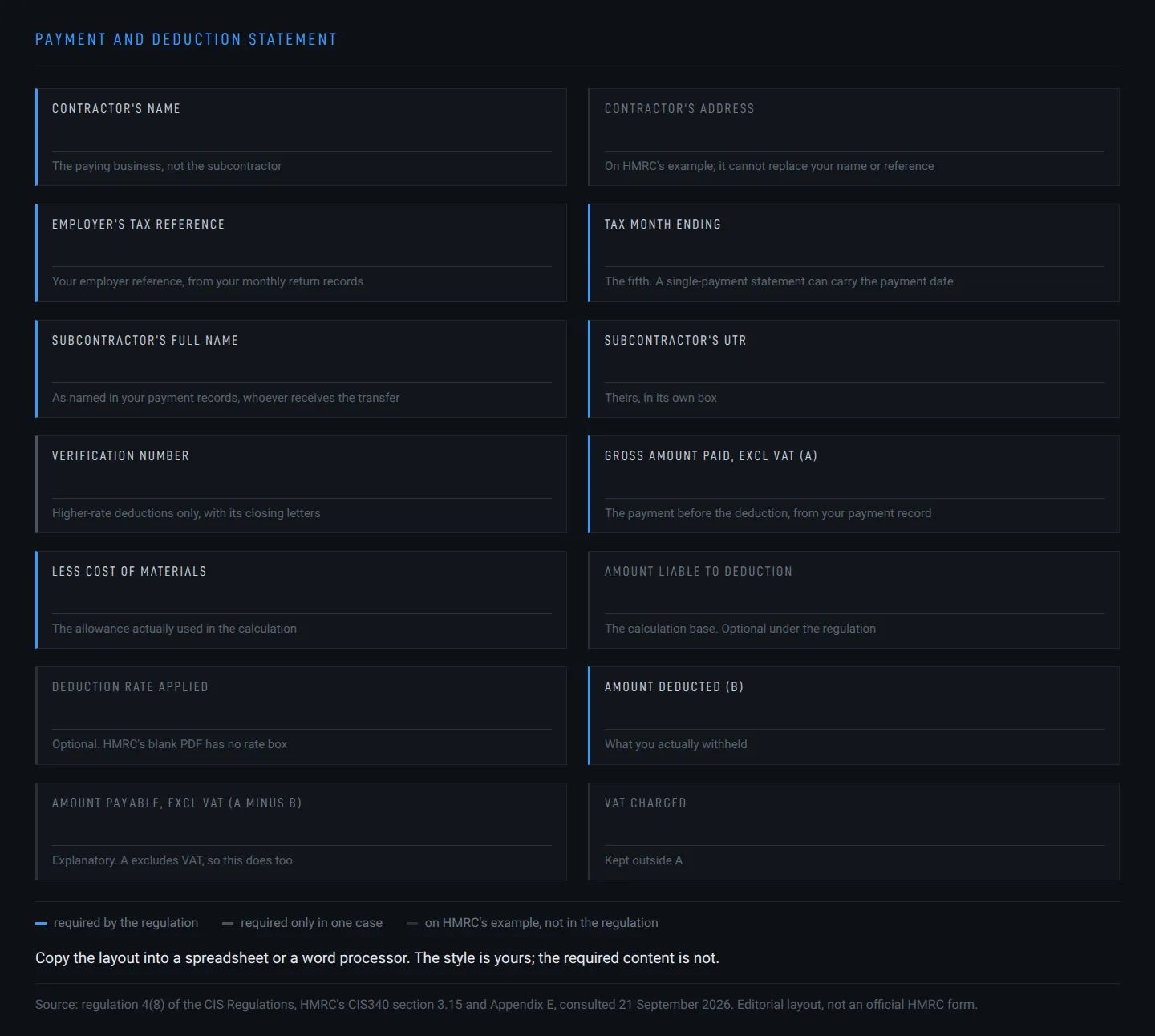
At the top, your business name
In Contractor’s name, you enter the paying business’s name. Your subcontractor’s name goes further down.
Contractor’s address is optional under the Income Tax (Construction Industry Scheme) Regulations 2005, regulation 4(8). HMRC includes it in its example. An address helps identify you, but it cannot replace your name or tax reference.
Your employer reference above, their UTR below
For Employer’s tax reference, use your paying business’s PAYE (Pay As You Earn) employer reference, copied from your CIS monthly return records. Regulation 4(8) calls it the contractor’s employer’s reference, and CIS340 Appendix E prints it in employer-reference format.
HMRC labels the PDF box “Employer’s Tax Reference”. Your layout can keep that wording. Putting the subcontractor’s UTR here misidentifies the payer.
The date identifies the payment period. Delivery is due by the 19th.
Tax month ending takes the end date of the payment’s tax month, which falls on the fifth under CIS340 section 3.15. A tax month runs from the sixth of one month to the fifth of the next. HMRC’s example covers 6 May to 5 June: enter 5 June and deliver by 19 June, because section 3.15 requires delivery by the nineteenth of the month containing that tax-month end. For a single-payment statement, you can enter the payment date.
Regulation 4(8) and CIS340 expressly allow monthly or per-payment statements, with at least one per relevant tax month under CISR12160. HMRC’s download page says “each time you pay them”, which conflicts with that permission. A statement for each payment satisfies both descriptions.
CIS340 section 3.19 requires you to exclude amounts shown on earlier statements. A payment already covered individually stays out of a later monthly total.
HMRC can seek a penalty for failure to provide the statement under section 98(1)(b) of the Taxes Management Act 1970, with daily penalties if the failure continues after the initial penalty is imposed. HMRC’s public guide and the law quote different penalties for non-delivery, and neither removes your duty to supply accurate written payment and deduction details.
The subcontractor stays named, whoever gets the transfer
Under Subcontractor’s full name, you enter the person or business named as subcontractor in your payment records.
Even if they authorise payment to someone else, you still name the subcontractor and issue the statement to them. CIS340 section 3.17 covers another recipient such as a debt factor, and section 6.4 covers a nominee.
The recipient of the bank transfer may therefore be different from the recipient named on this paper.
Below their name, the subcontractor’s UTR
Unique Taxpayer Reference, or UTR, is the subcontractor’s tax reference, taken from the details they supply for HMRC verification. CIS340 section 3.15 requires their UTR alongside your employer reference, so the statement identifies each side of the payment.
Their UTR keeps its own box when a higher-rate verification number is needed: the verification reference is an additional entry.

Higher-rate deductions need the full verification reference
Verification number needs filling in where you could not verify the subcontractor and made a higher-rate deduction.
HMRC gives you the reference when it cannot match their details to its records. Copy the complete reference, including any letters at the end: CIS340 section 3.8 says those letters make the unmatched reference unique to that subcontractor.
For standard-rate deductions, HMRC says you need not show it. The template marks the condition so a blank box is expected in that case.
Box A starts with the payment before deductions
Gross amount paid, excluding VAT (A) takes the payment before the CIS deduction. The source is your payment record. CIS340 section 3.18 requires you to record it on or before paying.
A net payment understates this box. A VAT-inclusive invoice total brings VAT into a field HMRC explicitly labels “Excl VAT”. You enter the gross payment covered by this statement.
The materials box carries the allowance you actually used
In Less cost of materials, enter what the subcontractor paid directly for materials on this contract, the allowance already used in your deduction calculation and required by CIS340 section 3.15. Their mark-up stays out.
Under CIS340 section 3.12, that cost excludes VAT if the subcontractor is VAT-registered. It includes VAT they paid if they are not registered.
The figure comes from the records supporting that payment’s materials and labour split. An invoice heading alone is not the figure to copy: this box needs the materials amount actually allowed.
The base and rate explain the deduction
Amount liable to deduction is A less the materials cost allowed. HMRC includes it in its example, but under regulation 4(8) a separate base field is optional.
Deduction rate applied records the rate HMRC told you to use through CIS subcontractor verification or a later notice, and it is optional too: HMRC omits a dedicated rate box from its blank PDF, while Appendix E shows the rate alongside the base label. Your layout can give it a separate field. What you must show is the amount deducted.
Box B: what you actually withheld
For Amount deducted (B), enter the CIS deduction actually withheld, from your payment record. HMRC’s CISR72060 tells staff to compare the statement with the payments and deductions on your monthly return, so check that both agree with your payment records before sending. A mismatch can prevent acceptance of the subcontractor’s claim for tax credit or repayment.
For subcontractors paid gross, meaning paid without a CIS deduction, CIS340 section 3.15 calls a payment statement good practice, without an obligation to issue one. “Gross amount” in box A means the amount before deductions. The deduction-statement duty applies when you deduct.

A minus B still excludes VAT
Amount payable (A minus B) is optional, and it follows HMRC’s example: the gross payment excluding VAT, less the CIS deduction. A excludes VAT, so the result does too, and the template says so on this explanatory line.
VAT charged can appear separately under CIS340 section 3.15, to help explain the payment. VAT stays outside A.
You can email the statement, with consent
The completed statement goes to your subcontractor in writing; paper is acceptable.
For electronic delivery, regulation 4(9) requires you to have told them you intend to use it. They must have consented without withdrawing consent. The format must let them store the statement and print a paper copy.
Generating and sending are separate actions. For example, Sage Accounting’s own “Create subcontractor statements” help page, checked on 21 September 2026, says it creates statements with the monthly return but leaves delivery to you: you send or print the downloaded statements. Whatever software you use, the statement still has to reach them.

The figures need records behind them
Your CIS records must be kept for at least three years after the end of the tax year they concern, under regulation 51(10) and CIS340 section 4.16. Those retained payment records support the figures if queried.
A saved statement is a practical part of your getting paid paperwork. The retention duty covers the underlying payment and deduction records; keeping a statement alone is not the whole job.
HMRC’s replacement instructions cover lost or undelivered copies. When a statement is simply lost, you can supply another copy, clearly marked “Duplicate” as CIS340 section 3.16 requires.
HMRC gives no procedure for correcting an already-issued statement, either in CIS340 or in its PDS manual pages. You still owe the subcontractor accurate written information supported by your payment records.
The practical response is to give the correct figures and explain the error. That follows the accuracy duty; it is not a published HMRC reissue procedure.
If your monthly return is wrong too, it needs correcting separately: HMRC’s matching check requires the statement and the return to agree.
When the statement goes missing, the copy is yours to supply: HMRC’s CISR73630 sends a subcontractor without one back to you first, before CISR74030 turns to bank statements or invoices.

Trade resources for tradespeople, straight to your inbox.
Occasionally we will send you a newsletter. Free, unsubscribe in one click.
Keep reading

CIS monthly return deadline: paid on time, but filed late?
Paying HMRC on time can still leave your return late. An empty month also needs reporting unless an exemption applies. Once a return is overdue, its penalty clock keeps running even as the next month comes round.

CIS verify subcontractor online: can you trust their word?
Your subcontractor says you should pay without deductions. HMRC's payment instruction decides. If they've worked for you before, your old monthly returns establish whether you need to verify them again.

CIS explained for UK trades
Paying subcontractors puts the CIS deduction, return and paper trail on your business. That applies to your subcontractor payments even on a job in someone's kitchen, and even when another contractor is making deductions from your own invoices.